Similar Items
Not the product you're looking for? We can make some suggestions to help you decide on a product that fits your needs.
view similar products
-
Manufacturer Warranty
Beyond any applicable Newegg return policy, this item is warranted independently by the product's Manufacturer. Below is a summary provided for convenience only and may not be accurate or current.
Use this link for full details.
- Manufacturer Limited Warranty period (parts): 3 years
- Manufacturer Limited Warranty period (labor): 2 years
Manufacturer Contact Info
Return Policies
This item is covered by Newegg.ca's Standard Return Policy.
- Return for refund within: 30 days
- Return for replacement within: 30 days
- Restocking Fee: Yes
|
-
- 5
-

- 36%
- 4
-

- 31%
- 3
-

- 8%
- 2
-

- 8%
- 1
-

- 17%
| Product Rating: |
   
|
| Total Reviews: |
52 |
bad motherboard, bad service
- Pros: Looks good, has everything I need except SPDIF port.
- Cons: Very angry. I got a bad motherboard, which made the system unstable and restart randomly. At first, I though that it was just incompatible with the memory, so I bought another set of memory. However, the problem still existed. Then, I requested RMA, which it the slowest RMA I ever had. It took me almost 3 weeks to receive another motherboard.
However, this is not over, and I got the exactly the same problem with new motherboard. At this time, I made a wrong decision to doubt CPU and power supply, and I RMA CPU, bought another power supply. After I tested my computer with brand new CPU and power supply, I was really angry. The problem still existed!! I got 2 motherboard with the problem!! What is the possibility? Or they might just give me the bad motherboard I sent to them.
Finally, I gave up, and bought a ASUS motherboard, and now it's working.
Wasted more than $200 and 2 months on replacement.
- Other Thoughts: Receiving a bad motherboard is unfortunate, because nobody can make things perfect. However, the bad service is unacceptable.
Don't buy a motherboard from such a company with bad quality and service.
Worked without a hitch
- Pros: Everything plugged in easy and it fired right up. One thing to remember is this board does not support SLI and the RAM is 1333.
My spec: Antec 1200 case BIOSTAR TForce TA790GX Antec Signature 650w power supply Western Digital Caviar Black WD1001FALS 1TB internal HD AMD Phenom II X4 965 Black Edition Deneb 3.4GHz G.SKILL 6GB (3 x 2GB) 240-Pin DDR3 SDRAM DDR3 1333 XFX HD-577A-ZNDC Radeon HD 5770 Windows 7 Pro 64 bit
- Cons: None
Pretty decent board
- Pros: Inexpensive (Got it for free, basically! Got a great deal at Fry's: $178 combo deal for a Phenom II x4 965 BE and this MB!). Nice SATA cables. The stock CPU fan is *not* noisy despite what some peeps say (you can adjust how aggressively the fan spins in the BIOS). Runs Windows 7 Ultimate 64-bit (beta 7100) stably. I'm not an OC'er, but the BIOS seems to offer a lot of customizability. Easy BIOS update from within Windows via BIOSTAR update utility. Pure AM3. Cute little system reset & system power-on buttons built onto the MB (why would you really need these?). Decent on-board video, so if you're not a mega-gamer, you won't really need to buy a vid card.
- Cons: Thin PCB (not a big con). BIOS documentation weak (big con, in my book). Stock BIOS had "SYS TEMP", but upon upgrading to the latest BIOS version, "SYS TEMP" got removed :( For this board, I think SYS TEMP is the temp of the South(or North?)Bridge chip. This chip was SCREAMING hot to the touch upon first boot (71C). After Windows got installed & updated BIOS, this chip is now merely warm to the touch. A fat vid card in the primary PCIE slot looks like it will encroach upon the adjacent PCI slot. Hopefully, you have one or fewer PCI card needs. Multi-GPU vid cards are incompatible (I've read). Do your homework on this board before trying CrossFire. Can't seem to find in the BIOS where to switch between Ganged & UnGanged (dual channel & single channel) memory mode. I dont' like the sideways facing SATA heads. No E-SATA :(
- Other Thoughts: Before you low-egg this MB, give it a chance & make sure the BIOS settings are correct (and don't ever use the drivers that come on the CD! Windows 7 will load its own!). One reviewer said his keyboard won't work. He didn't say if it was a PS/2 or a USB. If USB, then make sure USB keyboard support is enabled, etc. I was able to install Windows 7 Ultimate 64-bit (beta 7100) version with no problem. I don't know why people are having trouble with the RTM version (maybe their BOISes aren't configured correctly, AHCI, e.g.?). I was even using the "08-04-09" bios that came with the MB. I updated the BIOS with the Windows BIOS upgrade app to the "12-08-09" version with no problem.
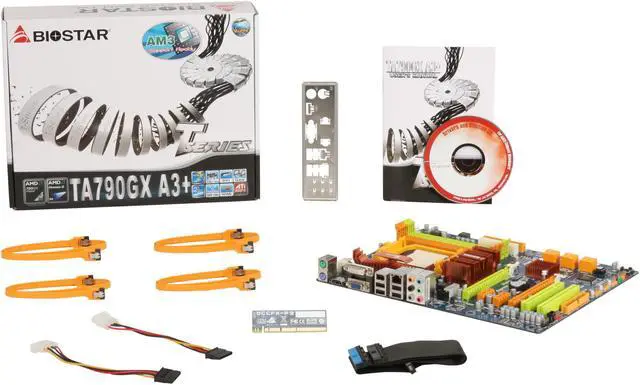
| Model |
| Brand |
BIOSTAR |
| Model |
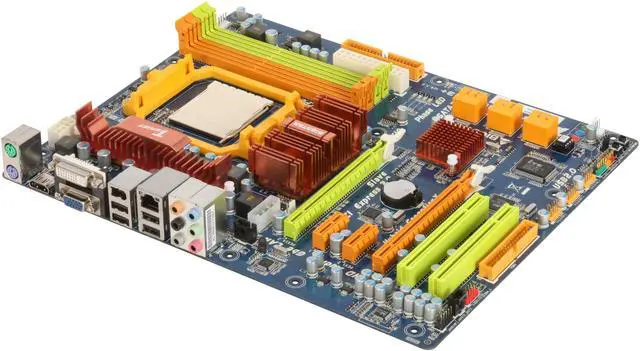
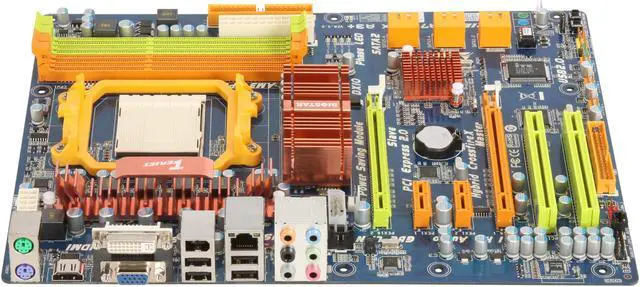
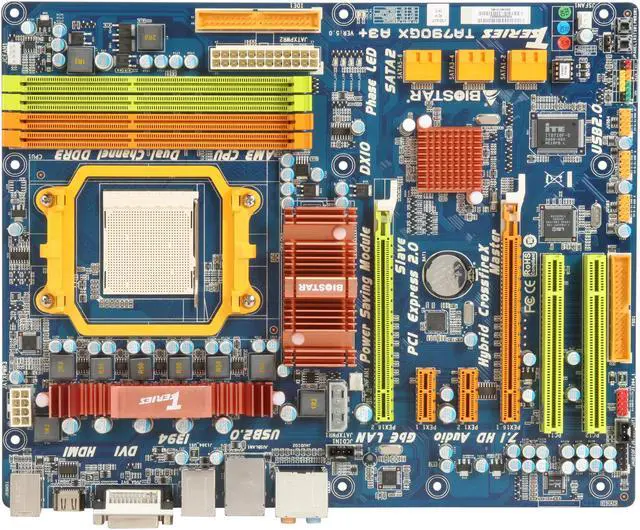
TForce TA790GX A3+ |
| Supported CPU |
| CPU Socket Type |
AM3 |
| CPU Type |
Phenom II X4 / Phenom II X3 |
| FSB |
2600MHz Hyper Transport (5200 MT/s) |
| Chipsets |
| North Bridge |
AMD 790GX |
| South Bridge |
AMD SB750 |
| Memory |
| Number of Memory Slots |
4×240pin |
| Memory Standard |
DDR3 800/1066/1333 |
| Maximum Memory Supported |
16GB |
| Channel Supported |
Dual Channel |
| Expansion Slots |
| PCI Express 2.0 x16 |
2 x PCI Express 2.0 x16 (single x16 or dual x8) |
| PCI Express x1 |
2 |
| PCI Slots |
2 |
| Storage Devices |
| PATA |
1 x ATA100 2 Dev. Max |
| SATA 3Gb/s |
6 |
| SATA RAID |
0/1/5/10 |
| Onboard Video |
| Onboard Video Chipset |
ATI Radeon HD3300 Graphicswith 128MB Side-port memory, Max. Memory Share Up to 512 MB |
| Onboard Audio |
| Audio Chipset |
Realtek ALC888 |
| Audio Channels |
8+2 Channel |
| Onboard LAN |
| LAN Chipset |
Realtek 8111DL |
| Max LAN Speed |
10/100/1000Mbps |
| Rear Panel Ports |
| PS/2 |
2 |
| Video Ports |
D-Sub + DVI |
| HDMI |
1 x HDMI |
| USB 1.1/2.0 |
4 x USB 2.0 |
| IEEE 1394 |
1 x IEEE 1394a |
| Audio Ports |
6 Ports |
| Onboard USB |
| Onboard USB |
6 x USB 2.0 |
| Physical Spec |
| Form Factor |
ATX |
| Dimensions |
12.0" x 9.6" |
| Manufacturer Warranty |
| Parts |
3 years limited |
| Labor |
2 years limited |
|